
Before buying new hardware, make sure you're using the hardware you already own
RAM prices are up over 400% in a year. Where to find capacity before you buy more hardware, and when buying is the right call after all.



If you've requested a quote for new servers recently, you've probably noticed something unusual.
Several Vates customers and partners have told us that hardware quotes are now only valid for a matter of days. In some cases, memory pricing isn't even included in the initial proposal and is only confirmed at the time of ordering.
🔗 Summary
The numbers explain why. Since mid-2025, DRAM prices have gone vertical. A 32 GB DDR5 kit that cost around $80 in the summer of 2025 was hitting roughly $432 by early 2026, a jump of more than 400% in under a year. Server-grade modules took an even harder hit: DDR5 64 GB RDIMMs, the standard unit in enterprise environments, are on track to cost twice what they did in early 2025 by the end of the year.
Cloud providers and hyperscalers building AI infrastructure are absorbing a massive share of global DRAM production. Over 65% of 16Gb DDR5 UDIMM wafers were allocated to server and AI accelerator modules in January 2026, squeezing consumer and mid-market channels hard.
The situation is compounded by DDR4 scarcity. Counter-intuitively, legacy DDR4 has become more expensive than DDR5 in some configurations, as older fabs are phased out while demand from installed platforms remains strong. If you're running older servers with no immediate plans to replace them, that creates a painful double bind: you can't easily move to DDR5, and your existing memory tier is getting harder and more expensive to source.
The result is simple: expanding infrastructure has become more expensive, less predictable, and harder to plan.
For years, when faced with capacity constraints, the natural reaction was to buy hardware. More RAM. More servers. More storage. Before doing that today, there is a more important question worth asking:
Are you actually using the memory you already own?
The hidden capacity inside most virtualized environments
Virtualized environments rarely stay exactly as they were designed.
Applications evolve, teams change, projects come and go, and workloads that were originally sized conservatively often remain untouched for years. A virtual machine deployed with 16 GB of RAM "just to be safe" may still have the same allocation long after its actual requirements have changed.
Development and testing environments are another common source of hidden capacity. Temporary workloads become permanent. Legacy applications remain online long after anyone actively uses them. Resources stay reserved because nobody wants to take the risk of removing them.
None of this is unusual. It's a natural consequence of operating a virtualized infrastructure over time. The challenge is that these inefficiencies are invisible. Most organizations know when they are running out of resources. Far fewer know how much of their existing capacity is actually being consumed.
Optimization starts with visibility
Identifying unused capacity is easier said than done.
Most IT teams already have monitoring tools, dashboards, and performance metrics. The problem isn't a lack of data. It's making sense of that data across an infrastructure that has evolved over many years. VMware clusters coexist with newer XCP-ng deployments. Test environments run on different hypervisors. Hardware generations vary from one site to another. Getting a clear picture of resource utilization quickly becomes complicated.
This is where capacity planning tools earn their place. Rather than looking at hosts or virtual machines in isolation, DC Scope by EasyVirt provides a consolidated view of consumption across the entire infrastructure: CPU, memory, storage, growth trends, and future capacity requirements from a single interface. It answers the questions every infrastructure team faces:
- Which virtual machines are oversized?
- Which workloads consume the most resources?
- How much capacity actually remains available?
- When will additional hardware really be required?
- What would be the impact of consolidating workloads or retiring unused ones?
DC Scope is now fully integrated into Vates VMS. It deploys as a single OVA, runs agentless, and comes with a 15-day free trial available directly from your Xen Orchestra interface. It also supports multiple hypervisors, so a mixed VMware and XCP-ng estate can be analyzed from one place rather than through fragmented datasets.
Capacity planning becomes even more valuable during migration projects. Understanding actual CPU, memory, and storage consumption often helps organizations right-size their future environment, eliminate unused workloads, and avoid unnecessary hardware purchases during the transition.
 Marc-André Pezin
Turning visibility into action
Visibility only matters when it leads to better decisions. Once consumption is clear across the infrastructure, a few opportunities usually appear.
The first is reclaiming what you already own. Oversized VMs, forgotten workloads, and idle resources can generally be right-sized without any impact on users or applications. One EasyVirt customer, CDC Habitat, reduced CPU and RAM consumption by roughly 10% after analyzing and rightsizing its environment, while also improving application performance.
The second is planning growth on real numbers. Saturation forecasting based on actual consumption trends tells you when CPU, RAM, or storage will hit their limits, and simulation lets you model the impact of adding, removing, or consolidating workloads before touching anything in production.
The third is timing. In many cases, optimization frees up enough capacity to postpone a purchase, extend the lifespan of existing servers, or reduce the scope of an upcoming project. At current memory prices, a few months of delay is worth real money.
Backup infrastructure deserves the same attention. Xen Orchestra's backup engine is designed to be efficient, but configuration matters: incremental backups, retention policies, off-peak scheduling, and immutable storage all carry resource implications. Immutable backups are a good example. They're essential against ransomware, and their overhead is something you want to size correctly from the start rather than discover after the fact.
Older hardware: don't rush to replace it
This is the brownfield question: what can you actually get out of what you already run? If you're running older servers, rising RAM prices are not in themselves a reason to refresh the fleet. When existing machines run well and workloads are right-sized, keeping them in production with proper support often makes more financial sense than replacing them at today's prices.
XCP-ng is notably flexible here. Its hardware support is based on Linux kernel drivers and covers a very wide range of devices, so it doesn't require servers from a curated short list. Machines that aren't on the official HCL can very often still run XCP-ng and still receive professional support from Vates.
Even if your server isn't on the official Hardware Compatibility List, there's still a very high chance you can run XCP-ng and benefit from pro support. Vates explicitly commits to investigating issues on non-HCL hardware, not just turning customers away.
Why this is a good moment to talk to us
Vates has never built a business model around pushing hardware refreshes. The stack, XCP-ng as hypervisor, Xen Orchestra for management and backup, DC Scope for optimization and capacity planning, is designed around doing more with what you already have.
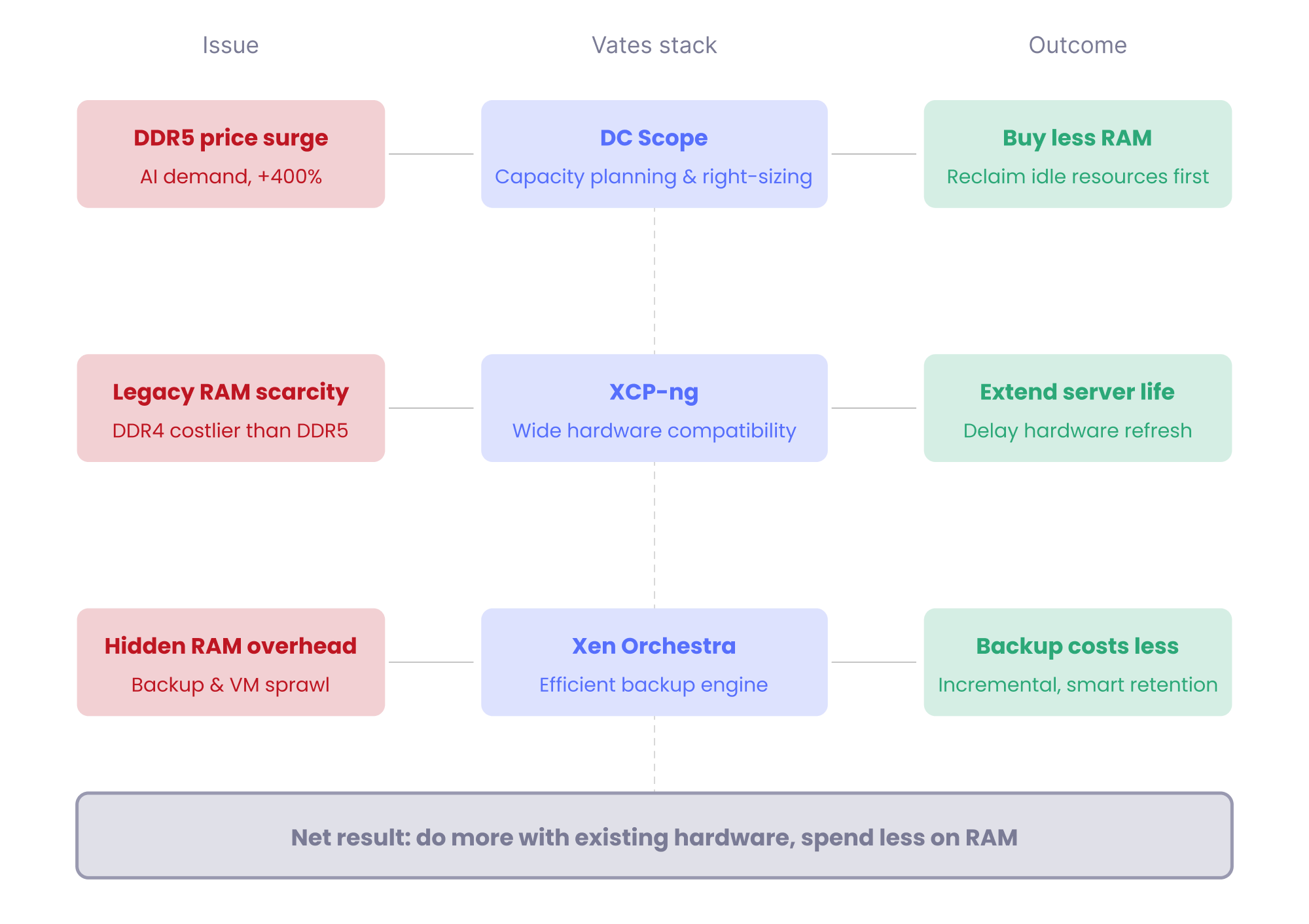
That shows up in a few practical places. Legacy and non-HCL hardware keeps full professional backing. DC Scope lets you recover idle memory before you budget for new capacity. And Vates VMS bundles are priced per host on a subscription model, not per socket, per VM, or per feature, which is exactly the kind of predictability you want when your hardware costs are moving every week.
Getting started
Cutting your exposure to RAM prices starts with knowing what you actually use.
- Discover DC Scope on the Vates platform and get an accurate picture of your RAM consumption
- Review the XCP-ng hardware support documentation to understand what your older machines are actually capable of
- Explore Vates VMS bundles: pro support, Xen Orchestra, and XCP-ng in a single subscription
- Book a demo of Vates VMS and see how the full stack addresses your situation
The memory market will eventually stabilize. In the meantime, there's a lot you can do with the infrastructure you already own.
This article covers the brownfield side of the question: getting more out of infrastructure you already run. The next article will look at the greenfield side, when building new makes more sense than optimizing, and at how refurbished and new hardware fit into a virtualization project.